The AIOC (All In One Cable)is a well known adapter to easily connect a handheld radio with a K style connector to a computer over USB-C for both audio, keying (PTT) and programming.


While the AIOC is versatile and powerful it can be hard to configure. Thats why I created the AIOC-UTIL command line utility. I true amateur radio spirit I made it open source. The AIOC-UTIL enables you to adjust various configuration registers from a command prompt where you have Python available. An example command line to adjust the VCOS timeout could be
./aioc-util.py --vcos-timctrl 1500 --storeWhile the README.md file from AIOC-UTIL tries to have clear setup instructions I thought it might be possible to make it even easier to configure through a web page. I therefore made a webpage version of AIOC-UTIL. The webpage can be found on https://aioc-util.tf3hr.net/ and the source code is found in the GitHub repository.
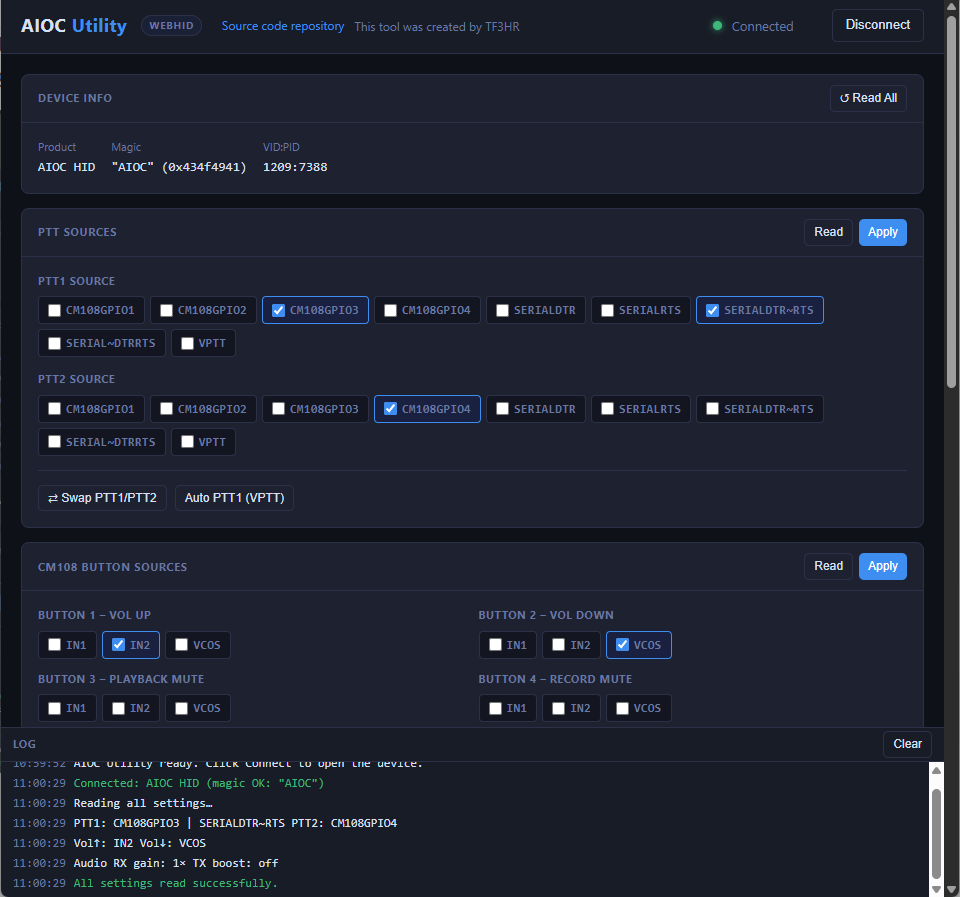
There is no “backend”, everything is running in the browser. Chromium based browsers have an implementation of the communication protocol used by the AIOC that allows for direct access to the AIOC hardware from the browser. The protocol is called HID and the implementation in the browser is WebHID. The WebHID is only supported on desktop browsers so unfortunately the AIOC-UTIL webpage will not run from a mobile phone.
I hope this simplifies using the great AIOC adapter. Go ahead and make a AllStarLink node, set up a FoxHunt or use the AIOC to have some SSTV fun with your handheld radio!
Leave a Reply